VLOOKUP can return #REF! even when the lookup value is sitting on the sheet. This one is the column index: the third argument asks for a column the range does not have. It is not the #REF! you get after you delete a cell.
Recreate it on a blank sheet
- Open a blank spreadsheet. In A1 type
sku, B1name, C1price, D1lookup, E1result. - In A2 type
101. B2Widget. C29.5. D2101. In E2 enter=VLOOKUP(D2,A2:B2,3,FALSE). The cell shows#REF!.
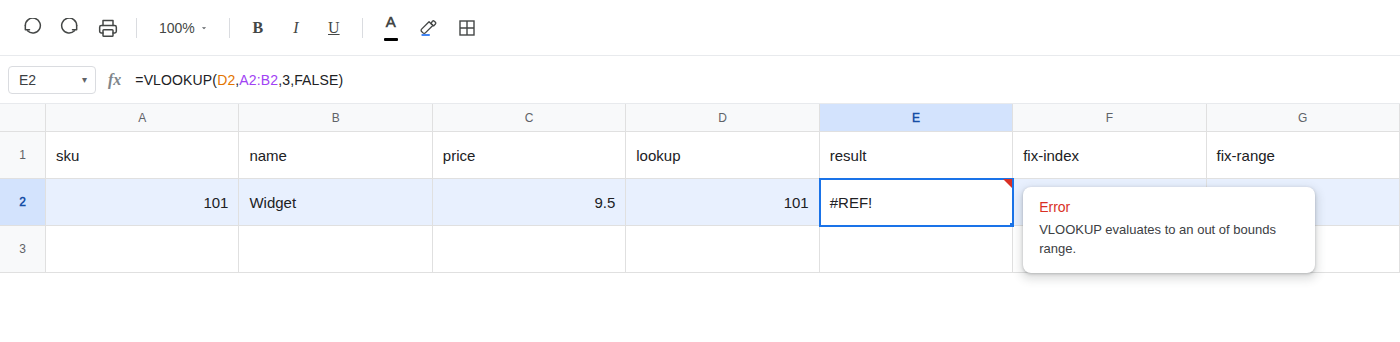
What is actually wrong
A2:B2is two columns wide. Index3asks for a third column that range does not contain.- Column C is on the sheet, but it is outside the range you passed.
VLOOKUPwill not walk into it on its own. - The lookup itself can succeed. The error is the return column, not a missing key and not a deleted reference.
Fix
Leave E2 as the broken formula so the error stays on the sheet. Put each fix in a neighboring cell.
-
Want the name: change the index to 2. In F1 type
fix-index. In F2 enter=VLOOKUP(D2,A2:B2,2,FALSE). The cell shows Widget. -
Want the price: keep index 3 and widen the range. In G1 type
fix-range. In G2 enter=VLOOKUP(D2,A2:C2,3,FALSE). The cell shows 9.5.
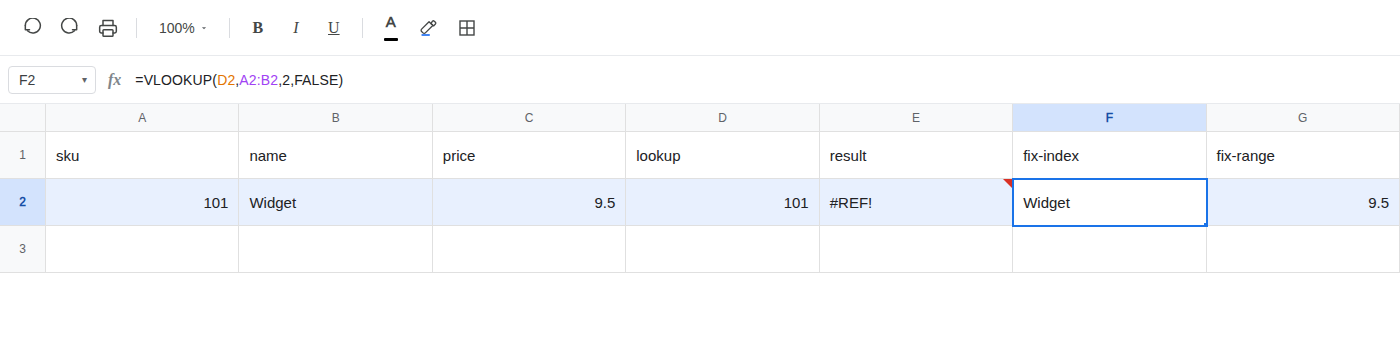
Count the columns in the range before you pick the index. Index 1 is the lookup column. Index 3 needs a range at least three columns wide.