IMPORTRANGE often lands as #REF! the first time you pull from a new spreadsheet. The formula is not broken. Sheets is waiting for you to connect the two files.
Recreate it on a blank sheet
- Open a new spreadsheet. This is the source. In A1 type
sku, B1name. In A2 type101. B2Widget. Leave the bottom tab namedSheet1. Copy the spreadsheet id from the URL: it is the long string between/d/and/editindocs.google.com/spreadsheets/d/<id>/edit. - Open a second blank spreadsheet. This is the target. In A1 enter
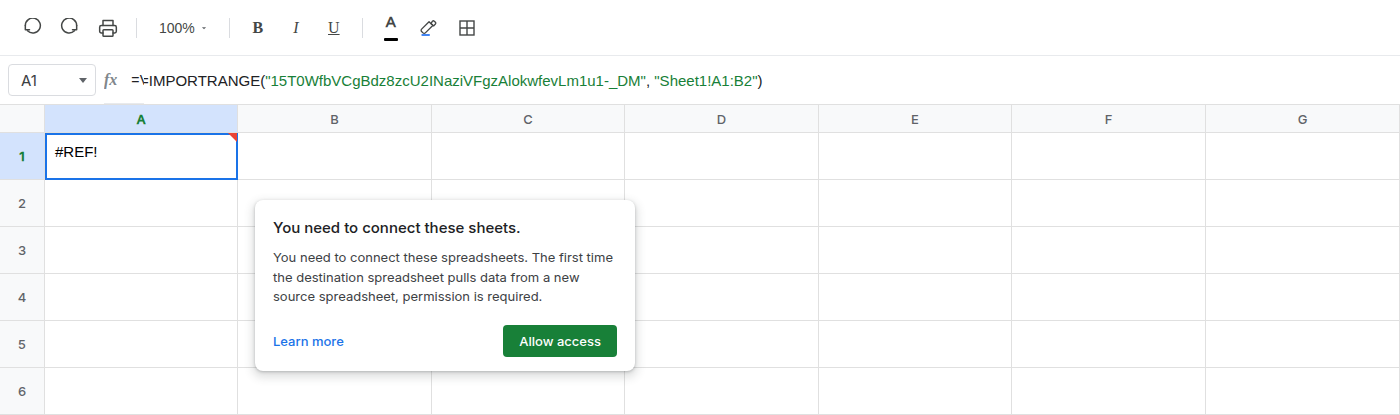
=IMPORTRANGE("SOURCE_ID","Sheet1!A1:B2"), pasting the id you copied. A1 shows#REF!and a prompt: You need to connect these sheets.
What is actually wrong
- The destination spreadsheet has never pulled from this source. Sheets blocks the import until you grant access on that in-sheet prompt.
- The range string is valid.
Sheet1!A1:B2is on the source tab. This#REF!is not a missing range and not a deleted cell. - You click Allow access once for this pair of files. Later
IMPORTRANGEformulas in the same destination against the same source do not ask again.
Fix
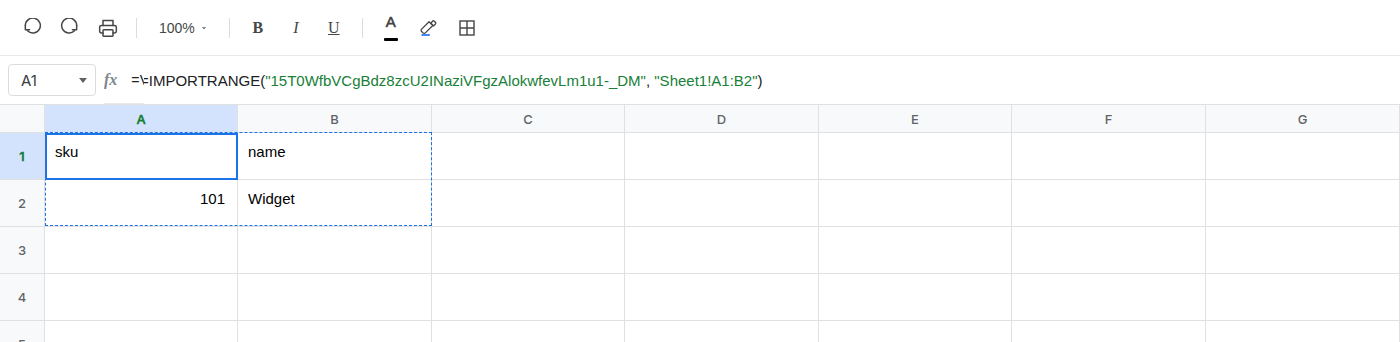
Click Allow access on the in-sheet prompt. Leave the formula as it is.
After the click, the same formula spills four cells: A1 sku, B1 name, A2 101, B2 Widget.
If #REF! is still there, check that you pasted the source id and that the tab name in the range string matches the source tab exactly.